Overview
Link to section: OverviewRVI-Sentinel is a defensive network-analysis toolkit for inspecting packet captures over time. It supports Apple's native Remote Virtual Interface (rvictl) workflow on macOS and integrates the upstream gh2o/rvi_capture project for iPhone/iPad packet capture on Linux and Windows.
The project deliberately separates capture from analysis:
A packet capture shows what happened during one session. A persistent baseline shows what changed.
The analyzer works with ordinary .pcap and .pcapng files from any authorized source. An iPhone, rvictl, or rvi0 is not required to use the analysis engine.
Executive Summary
Link to section: Executive Summary- macOS iPhone/iPad capture with Apple
rvictl+rvi0+tcpdump. - Linux and Windows iPhone/iPad capture through
gh2o/rvi_capture. - ChromeOS (Chromebook) capture through the built-in Linux development environment, using the Linux workflow.
- PCAP and PCAPNG analysis through
tshark. - IPv4 and IPv6 endpoint inventory.
- TCP and UDP port-frequency analysis.
- DNS query extraction.
- TLS Server Name Indication (SNI) extraction when visible.
- QUIC/HTTP/3-style traffic heuristics, including UDP/443 activity.
- DNS-label Shannon entropy heuristic for generated or encoded-looking names.
- Persistent first-seen / last-seen observations across captures.
- New-vs-known endpoint, DNS, and TLS-hostname detection.
- JSON investigation reports and CSV exports.
- Deterministic integration test that validates analysis without live capture.
Direct capability vs. interpretation
Link to section: Direct capability vs. interpretation| Type | Finding |
|---|---|
| Direct capability | capture_rvi.sh drives Apple's rvictl / rvi0 / tcpdump workflow on macOS. |
| Direct capability | capture_mobile.py integrates the separately fetched gh2o/rvi_capture backend for Linux and Windows. |
| Direct capability | analyze.py accepts authorized PCAP or PCAPNG input and produces persistent JSON plus CSV findings. |
| Direct verification | The deterministic analyzer integration test passes without an iPhone, rvictl, or rvi0. |
| Interpretation boundary | A newly observed endpoint or hostname is a baseline change, not proof of malicious activity. |
| Visibility boundary | Packet metadata does not defeat TLS, QUIC, VPNs, Private Relay, encrypted DNS, ECH, or application-layer encryption. |
Overall Architecture
Link to section: Overall Architecture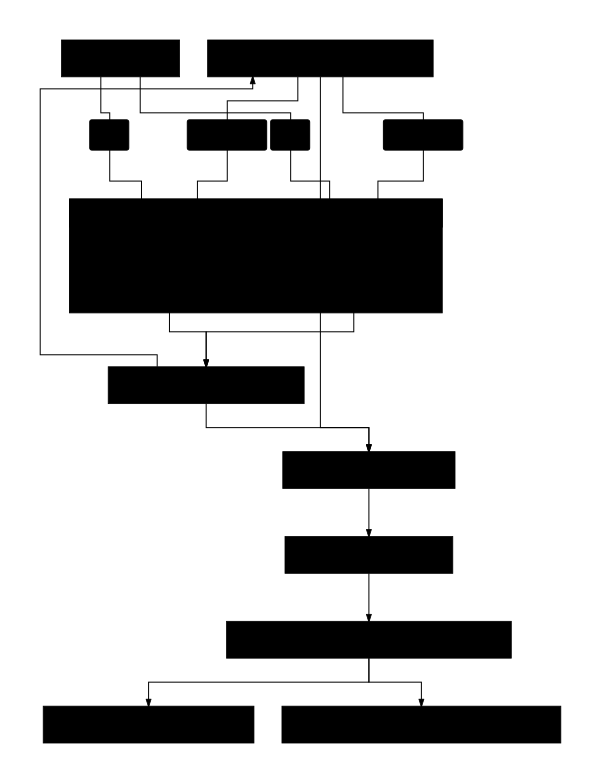
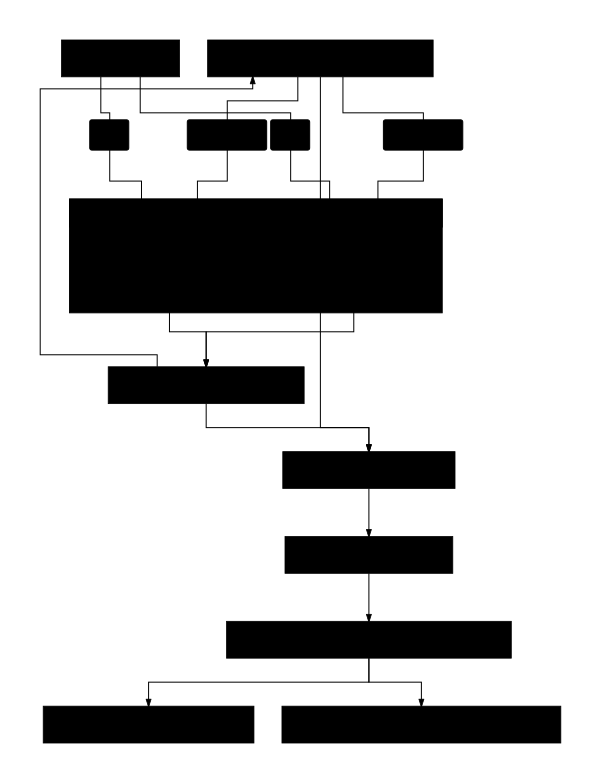
The two capture paths converge on the same host-independent analysis pipeline.
Text-only architecture
                              iPhone / iPad
                                   |
                                   | USB
                    +--------------+--------------+
                    |                             |
                  macOS                    Linux / Windows
                    |                             |
                 rvictl                    gh2o/rvi_capture
                    |                             |
                  rvi0                            |
                    |                             |
                 tcpdump                          |
                    +--------------+--------------+
                                   |
                                   v
                              PCAP / PCAPNG
                                   |
                                   v
                                tshark
                                   |
                      +------------+------------+
                      |            |            |
                      v            v            v
                 IP / ports       DNS       TLS / QUIC
                      |            |            |
                      +------------+------------+
                                   |
                                   v
                              analyze.py
                                   |
                      +------------+------------+
                      |                         |
                      v                         v
                 Current report            Persistent state
                  JSON + CSV              findings_master.json
The key design rule is:
CAPTURE LAYER != ANALYSIS LAYERVerified Analyzer Screenshot
Link to section: Verified Analyzer Screenshot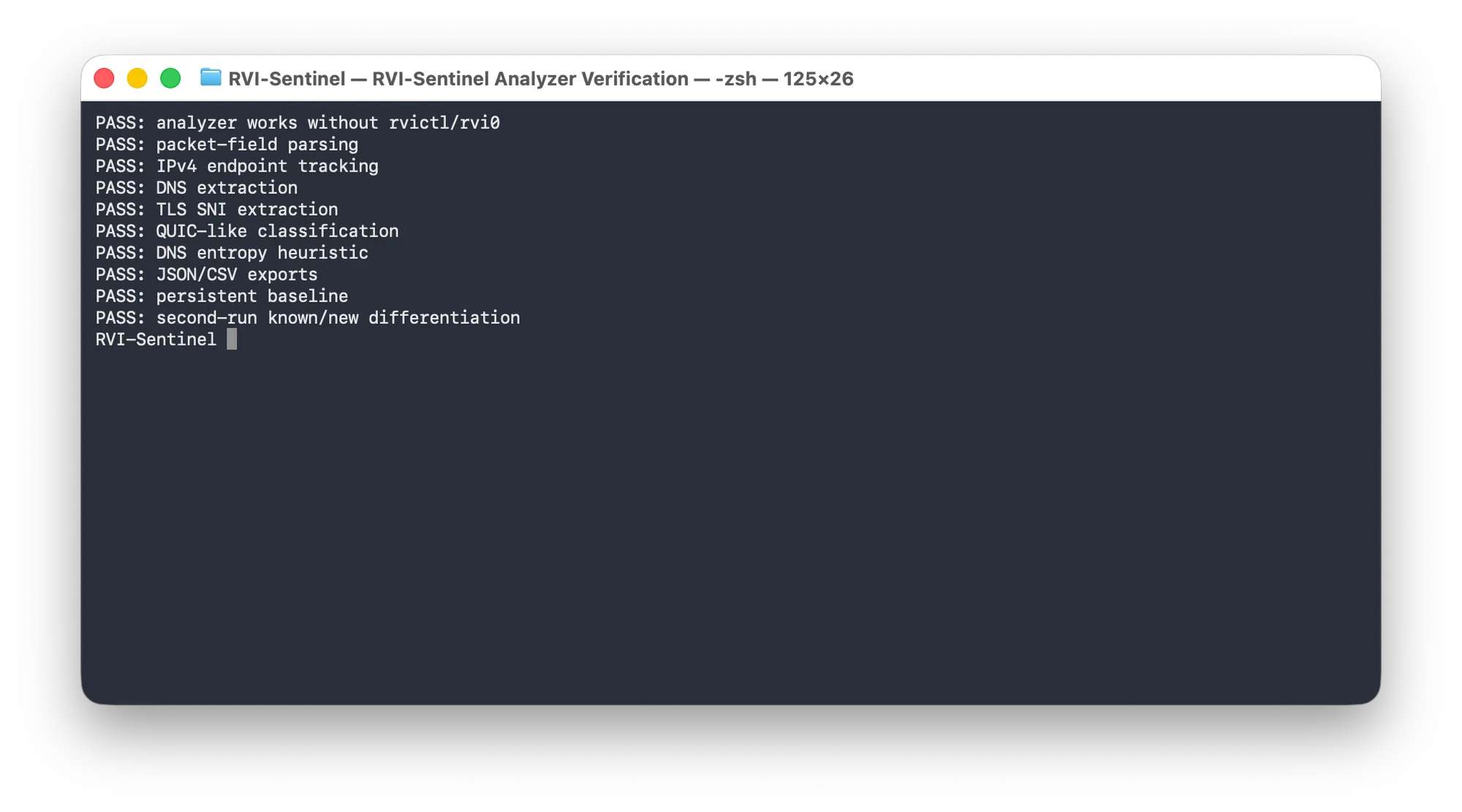
The screenshot records the repository's deterministic analyzer integration test. It verifies packet-field parsing, IPv4 endpoint tracking, DNS and TLS SNI extraction, QUIC-like classification, DNS entropy handling, JSON/CSV exports, persistent baselining, and known/new differentiation without requiring live device capture.
Installation
Link to section: InstallationClone RVI-Sentinel:
git clone https://github.com/hideouts-io/RVI-Sentinel.git
cd RVI-Sentinel
Check the analyzer:
python3 analyze.py --helpThe CLI analyzer uses Python's standard library. Packet decoding requires tshark, the command-line component of Wireshark. The optional desktop GUI uses PySide6.
Desktop GUI
Link to section: Desktop GUIThe desktop GUI presents capture, analysis, and setup checks as separate workspaces. It supports:
-
recognizing physical iPhone/iPad devices and showing connected-versus-offline state;
-
selecting a connected device in a guided capture dialog;
-
choosing a bounded capture duration from 5 seconds to 60 minutes;
-
choosing PCAPNG or PCAP and a local output path without overwriting existing evidence;
-
macOS readiness checks through Apple
devicectl, followed byrvictl, a temporary RVI interface, andtcpdump; -
Linux/Windows capture through the separately installed
gh2o/rvi_capturebackend; -
pass/fail setup checks for trust, USB access, capture backend,
tshark, output-folder permissions, and disk space, with a specific fix for each failure; -
live progress, cancellation, retryable no-traffic preflight, and platform-specific errors;
-
an unmistakable completion card with packet count, file size, actual packet-span duration, saved location, and next actions;
-
selecting or dropping an authorized PCAP, PCAPNG, or CAP file;
-
using a separate suggested baseline per device or imported investigation;
-
read-only analysis by default, followed by an explicit Add findings to baseline action;
-
configuring the DNS entropy threshold and console result count;
-
hiding device identifiers, exact commands, and raw process output under Advanced details;
-
copying redacted diagnostics that exclude device identifiers, packet data, and private paths;
-
summary, endpoint, DNS, TLS SNI, protocol, port, and entropy-heuristic views;
-
PTR reverse-DNS names and address-scope labels for every endpoint;
-
optional local MaxMind-compatible GeoIP city/country lookup without a web API;
-
TCP/UDP-aware service labels and plain-language port explanations;
-
a report-specific Interpretation view that explains scope, caveats, and next steps;
-
explicit new-versus-known baseline labels;
-
opening the generated export directory.
Create a project-local environment and install the optional GUI dependency:
python3 -m venv venv
venv/bin/python -m pip install -r requirements-gui.txt
Use the non-hidden venv/ directory shown above. In macOS File Provider-managed folders, a dot-prefixed environment such as .venv/ can propagate the hidden file flag to Qt plugins and prevent the Cocoa platform plugin from being discovered.
Launch the GUI:
./scripts/run_gui.shOn macOS, the launcher builds and ad-hoc signs a lightweight runtime app wrapper in the system temporary directory, outside a File Provider-managed Documents checkout. It starts with the project icon so RVI-Sentinel has its own Dock identity while all source, captures, baselines, and exports remain at their selected project paths. The generated wrapper stays outside version control and is recreated by scripts/run_gui.sh.
The app opens on Capture iPhone/iPad. Connect the device by USB, unlock it, trust the host if prompted, and choose Refresh Devices. New Capture… opens a dialog for the device, duration, format, and output path. Offline devices are recognized but cannot be selected until connected. The Check setup tab verifies the local prerequisites before capture. On ChromeOS, USB devices must be shared with Linux individually under Settings > Developers > Linux > USB preferences; see Google's Linux on ChromeOS FAQ.
On macOS, the timed capture requires a physical, booted, paired iPhone/iPad connected over USB. It then uses a narrow native administrator authorization prompt for tcpdump; RVI-Sentinel never asks for, reads, stores, or transmits the Mac password. The countdown stays stopped while authorization is pending and during a five-second live-packet preflight. If the connected phone is idle, open a webpage on it and choose Retry Traffic Check without re-entering the capture settings. Completed captures are closed, checked for the requested PCAP/PCAPNG header, and required to contain at least one readable packet. The completion card remains on the Capture tab so the user chooses what happens next. The temporary RVI interface is removed after success, failure, or cancellation.
On Linux (including the ChromeOS Linux development environment) and Windows, choose Install Capture Support once to clone the canonical gh2o/rvi_capture source into the ignored local tools/ directory. Linux still requires libimobiledevice and usbmuxd; Windows still requires iTunes or Apple Mobile Device Support and its running service.
Optionally open an existing capture immediately:
./scripts/run_gui.sh captures/authorized-capture.pcapngAnalysis requires the same tshark runtime dependency as the CLI analyzer. Live capture follows the platform-specific prerequisites below and never bypasses device trust, host authorization, or encryption.
Local GeoIP setup
Link to section: Local GeoIP setupGeolocation is deliberately local-only: RVI-Sentinel never sends captured endpoint IP addresses to a geolocation web API. To add approximate locations, download a current MaxMind-compatible City or Country .mmdb database, keep it outside version control (the repository's data/ contents are ignored), and choose it in Local GeoIP database before analysis. MaxMind provides GeoLite downloadable databases after account and license-key setup.
IP geolocation is approximate. It often represents a network or nearby population center and must not be interpreted as the exact location of a device, person, or household. PTR hostnames are also attribution hints rather than proof: they may be absent, generic, stale, shared, or controlled by a hosting provider. Reverse-DNS resolution sends PTR queries for the observed addresses to the Mac's configured DNS resolver.
GUI screenshots
Link to section: GUI screenshotsThese screenshots use a deterministic synthetic report and documentation-only sample values. No private capture, endpoint list, baseline, or generated report is included.
Endpoint names, scope, and approximate location
Link to section: Endpoint names, scope, and approximate location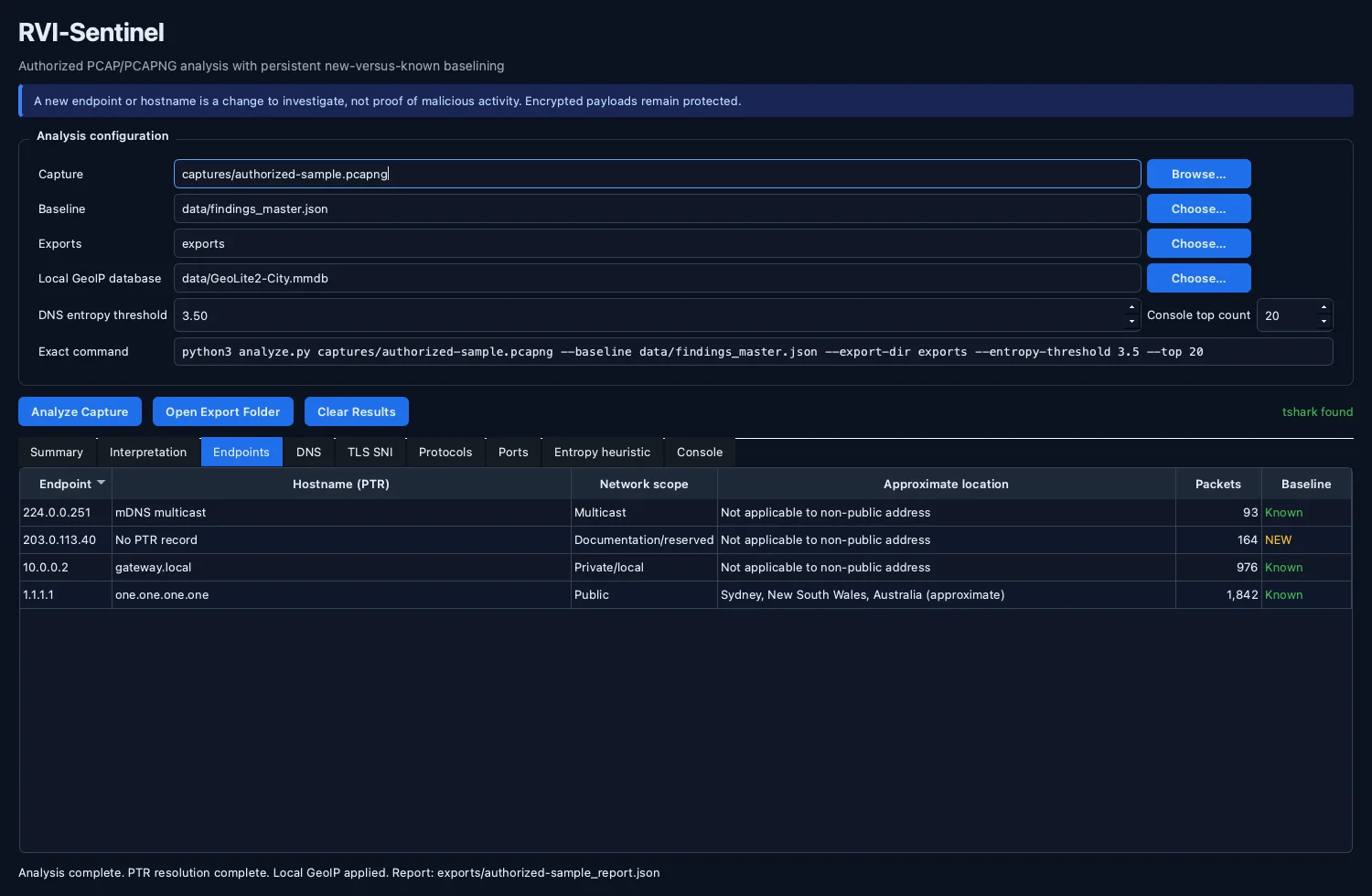
The Endpoints view keeps packet counts and baseline status alongside PTR hostname hints, address scope, and optional local-only GeoIP results.
Transport-aware port labels
Link to section: Transport-aware port labels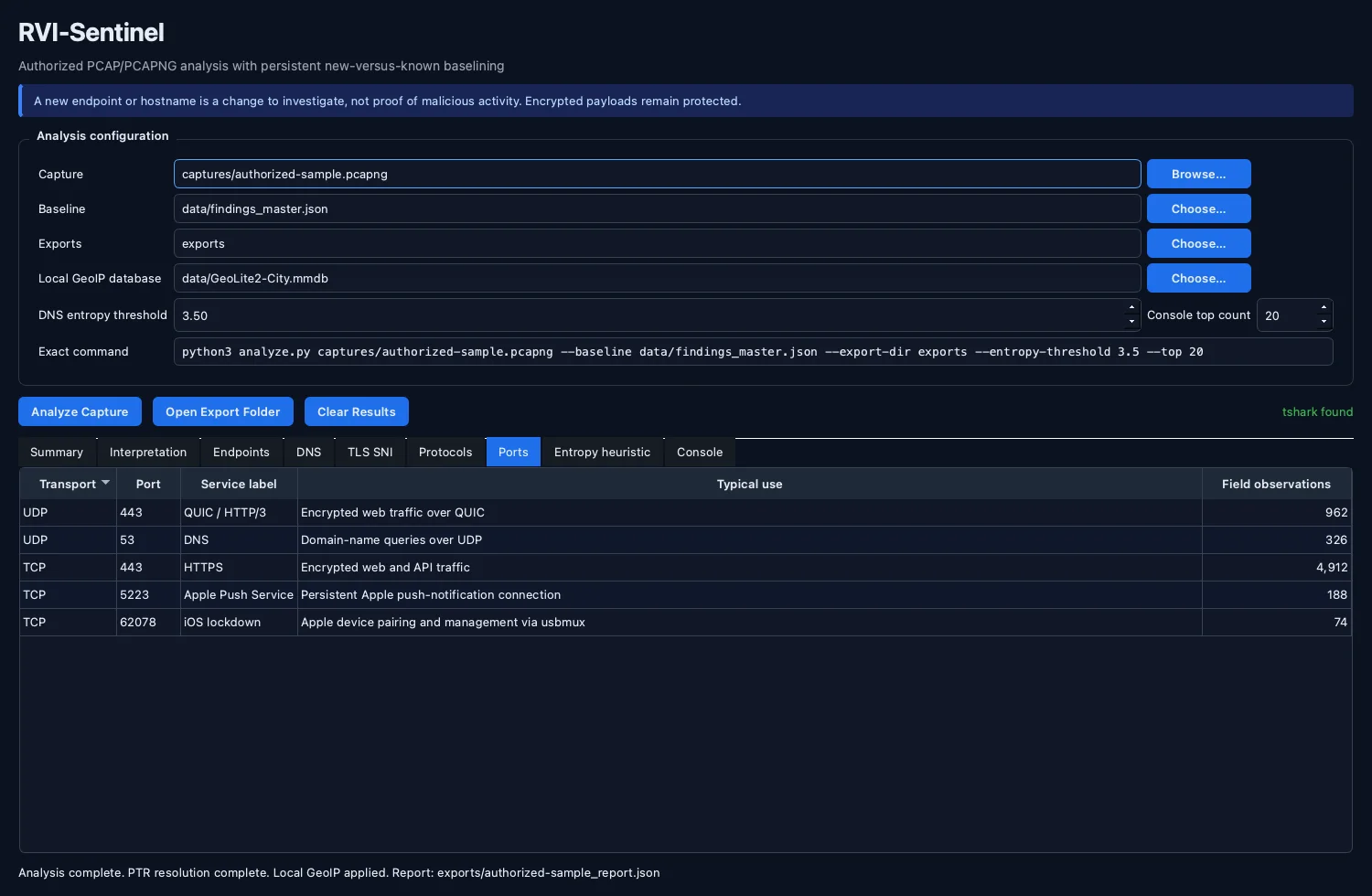
TCP and UDP observations remain distinct so the GUI can explain common uses such as TCP/443 HTTPS, UDP/443 QUIC/HTTP/3, UDP/53 DNS, TCP/5223 Apple Push Service, and TCP/62078 iOS lockdown. A conventional port label is context, not proof that a particular process or server was present.
Plain-language findings interpretation
Link to section: Plain-language findings interpretation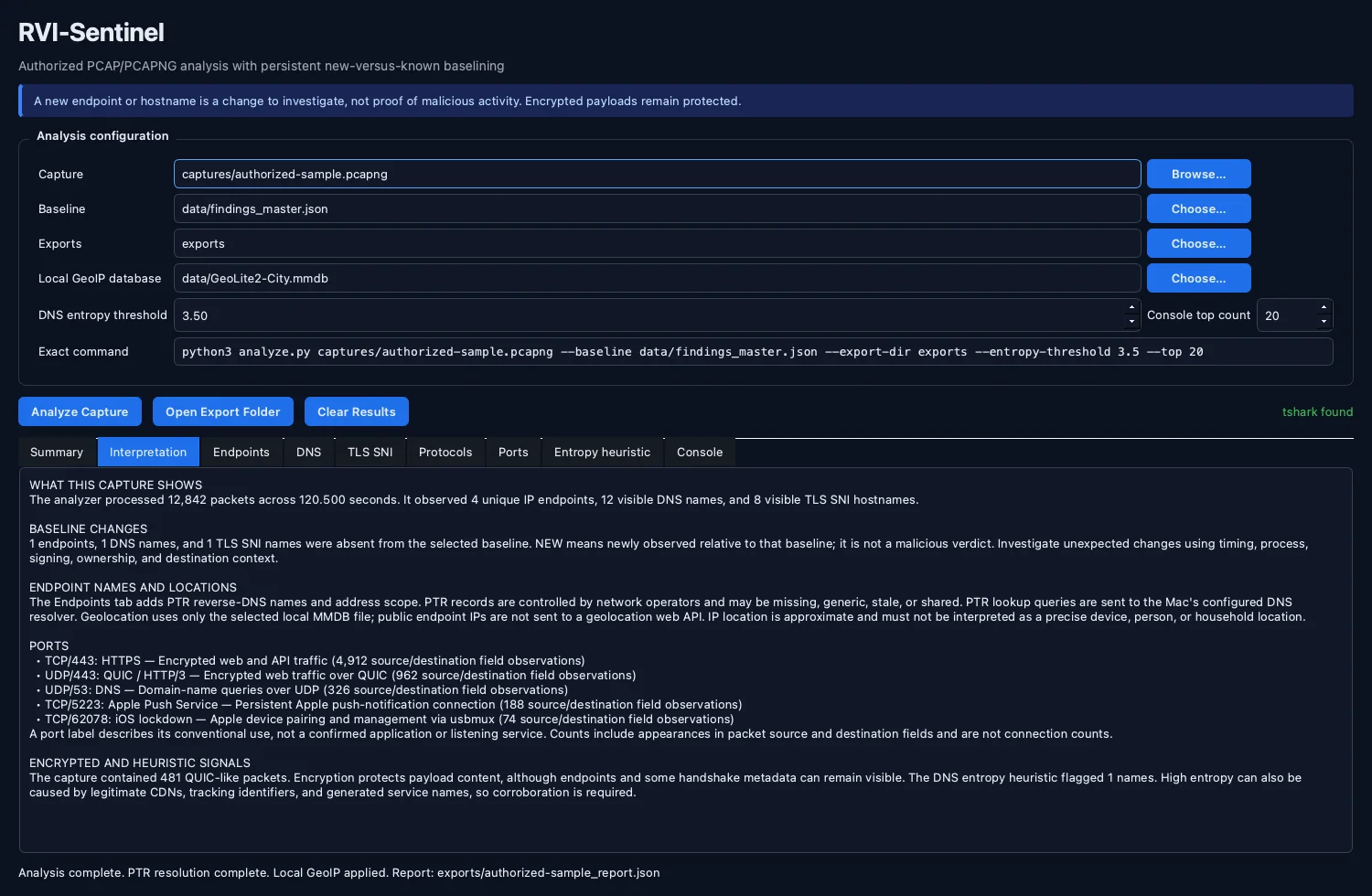
The Interpretation view explains the report-specific counts, new-versus-known baseline changes, endpoint-attribution limits, port observations, encrypted traffic, and entropy findings without turning a heuristic or newly observed value into a malicious verdict.
Analyze an Existing Capture
Link to section: Analyze an Existing CaptureGiven:
capture.pcapngrun:
python3 analyze.py capture.pcapngOutputs are written to:
data/findings_master.json

exports/
├── capture_report.json
├── capture_endpoints.csv
├── capture_dns.csv
└── capture_tls_sni.csv
Use a dedicated baseline for one device or investigation:
python3 analyze.py capture.pcapng \
  --baseline data/iphone_baseline.json \
  --export-dir exports/iphone
macOS Capture with Apple RVI
Link to section: macOS Capture with Apple RVIConnect and trust the iPhone/iPad over USB.
Find its UDID:
xcrun xctrace list devicesStart RVI:
./capture_rvi.sh start <UDID>or directly:
rvictl -s <UDID>A virtual interface such as rvi0 should appear:
ifconfig rvi0Capture:
./capture_rvi.sh capture captures/ios_capture.pcapngEquivalent manual command:
sudo tcpdump -i rvi0 -n -s 0 -U --apple-pcapng -Z "$USER" \
  -w captures/ios_capture.pcapng
Analyze:
python3 analyze.py captures/ios_capture.pcapngStop RVI:
./capture_rvi.sh stop <UDID>Linux and Windows Capture
Link to section: Linux and Windows CaptureCapture with gh2o/rvi_capture
Link to section: Capture with gh2o/rvi_captureRVI-Sentinel integrates the open-source project:
https://github.com/gh2o/rvi_capture
The upstream project describes itself as rvictl for Linux and Windows and creates packet-capture dumps from connected iOS devices. It supports both PCAP and PCAPNG, optional UDID selection, file/FIFO output, stdout streaming, and direct Wireshark streaming.
RVI-Sentinel does not copy the upstream Python implementation into this repository. Instead, the setup helper clones the canonical source directly so provenance remains clear.
Install the upstream capture backend locally:
python3 scripts/setup_rvi_capture.pyIt is placed at:
tools/rvi_capture/That directory is intentionally ignored by Git.
Update the upstream checkout later with:
python3 scripts/setup_rvi_capture.py --updateThe setup helper prints the exact upstream commit SHA so you can record which capture implementation produced a packet trace.
See SOURCES.md for attribution and provenance details.
Linux prerequisites
Link to section: Linux prerequisitesUpstream documents the following requirements:
- Python 3
libimobiledeviceusbmuxdrunning
On Debian/Ubuntu-derived systems, a typical starting point is:
sudo apt update
sudo apt install python3 libimobiledevice-utils usbmuxd
Confirm that the connected device is visible:
idevice_id -lInstall the upstream backend:
python3 scripts/setup_rvi_capture.pyCapture an iPhone/iPad to PCAPNG:
python3 capture_mobile.py \
  captures/iphone_linux.pcapng
Select a particular device:
python3 capture_mobile.py \
  --udid <IPHONE_UDID> \
  captures/iphone_linux.pcapng
Capture and immediately analyze:
python3 capture_mobile.py \
  --analyze \
  captures/iphone_linux.pcapng
Windows prerequisites
Link to section: Windows prerequisitesUpstream documents the following requirements:
- Python 3
- iTunes / Apple mobile-device components
AppleMobileDeviceService.exerunning
The upstream project states that its required libimobiledevice components are downloaded as needed on Windows.
From PowerShell:
python scripts\setup_rvi_capture.pyCapture:
python capture_mobile.py `
  captures\iphone_windows.pcapng
Specify the UDID:
python capture_mobile.py `
  --udid <IPHONE_UDID> `
  captures\iphone_windows.pcapng
Capture and analyze in one workflow:
python capture_mobile.py `
  --analyze `
  captures\iphone_windows.pcapng
ChromeOS (Chromebook) prerequisites
Link to section: ChromeOS (Chromebook) prerequisitesOn a Chromebook, RVI-Sentinel runs inside ChromeOS's built-in Linux development environment, a Debian container. Capture uses the same gh2o/rvi_capture backend and the same commands as Linux; the ChromeOS-specific parts are enabling Linux and sharing the iPhone or iPad with it over USB.
1. Turn on the Linux development environment
Link to section: 1. Turn on the Linux development environmentOpen Settings → About ChromeOS → Developers → Linux development environment, choose Set up, and follow the prompts. When it finishes, a Terminal app opens with a Linux shell.
2. Share the iPhone or iPad with Linux
Link to section: 2. Share the iPhone or iPad with LinuxChromeOS doesn't pass USB devices to Linux automatically:
- Connect the device with a data-capable cable, unlock it, and keep it unlocked.
- When ChromeOS shows a notification for the device, choose Connect to Linux. Or open Settings → About ChromeOS → Developers → Linux development environment → Manage USB devices and turn the device on.
- Tap Trust on the device if it asks.
Reconnect or re-share the device after unplugging it or restarting Linux.
3. Install the prerequisites in the Linux terminal
Link to section: 3. Install the prerequisites in the Linux terminalThe container is Debian-based, so the Linux prerequisites apply unchanged:
sudo apt update
sudo apt install python3 libimobiledevice-utils usbmuxd tshark git
Confirm the shared device is visible:
idevice_id -lIf nothing is listed, check that the device is still shared with Linux (step 2) and that usbmuxd is running:
sudo systemctl status usbmuxd4. Capture
Link to section: 4. CaptureClone RVI-Sentinel inside the Linux environment, install the upstream backend, and capture exactly as on Linux:
git clone https://github.com/hideouts-io/RVI-Sentinel.git
cd RVI-Sentinel
python3 scripts/setup_rvi_capture.py
python3 capture_mobile.py \
  --analyze \
  captures/iphone_chromeos.pcapng
Captures, baselines, and reports are written inside the Linux container. To open them from the ChromeOS Files app, look under Linux files.
Direct upstream usage
Link to section: Direct upstream usageAfter running the setup helper, you can invoke upstream rvi_capture.py directly.
Linux:
python3 tools/rvi_capture/rvi_capture.py \
  --format pcapng \
  --udid <IPHONE_UDID> \
  captures/iphone.pcapng
Windows PowerShell:
python tools\rvi_capture\rvi_capture.py `
  --format pcapng `
  --udid <IPHONE_UDID> `
  captures\iphone.pcapng
If --udid is omitted, upstream selects the first device it finds.
Then analyze normally:
python3 analyze.py captures/iphone.pcapngStream directly into Wireshark
Link to section: Stream directly into WiresharkThe upstream project can write capture data to stdout:
./tools/rvi_capture/rvi_capture.py - | wireshark -k -i -For RVI-Sentinel investigations, saving a PCAPNG first is often preferable because it creates a repeatable evidence artifact that can be re-analyzed later.
iOS interface metadata
Link to section: iOS interface metadataPCAPNG can retain interface metadata. The upstream rvi_capture documentation discusses iOS interfaces such as:
en0       Wi-Fi
pdp_ip0   cellular
ipsec1    IPSec outer transport observed for VoLTE
ipsec3    IPSec inner transport observed for VoLTE
In Wireshark, inspect:
frame.interface_nameThis can help distinguish traffic paths when the capture includes the relevant metadata.
Cross-platform capture matrix
Link to section: Cross-platform capture matrix| Host OS | iPhone/iPad capture backend | Output | RVI-Sentinel analysis |
|---|---|---|---|
| macOS | Apple rvictl + tcpdump | PCAP/PCAPNG | Yes |
| Linux | gh2o/rvi_capture + libimobiledevice/usbmuxd | PCAP/PCAPNG | Yes |
| Windows | gh2o/rvi_capture + Apple mobile-device services | PCAP/PCAPNG | Yes |
| ChromeOS | gh2o/rvi_capture + libimobiledevice/usbmuxd in the Linux development environment | PCAP/PCAPNG | Yes |
| Any analysis host | Existing authorized PCAP/PCAPNG | PCAP/PCAPNG | Yes |
Persistent Baselining
Link to section: Persistent BaseliningThe default state database is:
data/findings_master.jsonFor observed endpoints, DNS names, and visible TLS SNI values, RVI-Sentinel records historical context including first seen, last seen, observation counts, capture membership, and recent capture counts.
This allows a later capture to distinguish previously observed infrastructure from newly observed infrastructure.
A new endpoint or hostname is not automatically suspicious. It is simply a change worth contextualizing.
Current analysis fields
Link to section: Current analysis fieldsRVI-Sentinel asks tshark for fields including:
frame.time_epoch
ip.src
ip.dst
ipv6.src
ipv6.dst
tcp.srcport
tcp.dstport
udp.srcport
udp.dstport
dns.qry.name
tls.handshake.extensions_server_name
_ws.col.Protocol
Encryption limitations
Link to section: Encryption limitationsRVI packet visibility does not defeat TLS, QUIC, VPN encryption, iCloud Private Relay, encrypted DNS, ECH, or application-layer encryption.
You may still observe useful metadata such as source/destination addresses, ports, timing, traffic volume, unencrypted DNS, visible TLS SNI, and protocol classifications.
RVI-Sentinel does not attempt to bypass device security controls or decrypt protected application content.
Testing without live capture
Link to section: Testing without live captureRun:
python3 tests/test_analyzer.py
python3 -m tests.test_capture_models
python3 -m tests.test_gui_models
python3 -m tests.test_finding_enrichment
QT_QPA_PLATFORM=offscreen venv/bin/python -m tests.test_gui_integration
The automated tests do not connect to an iPhone, invoke rvictl, create rvi0, request administrator authorization, or capture live traffic. They validate physical-device readiness parsing, bounded capture requests, Apple PCAP/PCAPNG mode selection, clean termination, post-capture header checks, countdown/finalization state, deterministic tshark field output, and the analysis layer independently. Live validation remains an explicit local action because it requires a connected trusted device and native authorization.
The GUI integration test uses the same deterministic field stream to exercise Qt process execution, report loading, and results presentation without displaying a window or requiring live capture.
Expected completion includes:
PASS: analyzer works without rvictl/rvi0Repository structure
Link to section: Repository structureRVI-Sentinel/
├── analyze.py
├── capture_models.py # typed device and bounded capture contracts
├── capture_devices.py # macOS/Linux/Windows device discovery
├── capture_session.py # timed platform-aware capture runner
├── enrich_endpoints.py # bounded PTR and local GeoIP enrichment process
├── finding_enrichment.py # address, location, and port explanations
├── gui.py # PySide6 capture and analysis desktop UI
├── gui_models.py # typed request/report validation
├── capture_rvi.sh # macOS rvictl/rvi0 capture
├── capture_mobile.py # Linux/Windows frontend
├── scripts/
│ ├── run_gui.sh # launch GUI from project environment
│ └── setup_rvi_capture.py # fetch canonical gh2o/rvi_capture source
├── evidence/
│ └── rvi-sentinel-analyzer-test.png
├── .github/
│ ├── ISSUE_TEMPLATE/
│ │ ├── bug_report.yml
│ │ ├── feature_request.yml
│ │ └── config.yml
│ └── pull_request_template.md
├── CODE_OF_CONDUCT.md
├── CONTRIBUTING.md
├── SECURITY.md
├── SOURCES.md # upstream provenance/attribution
├── README.md
├── requirements.txt
├── requirements-gui.txt
├── LICENSE
├── .gitignore
├── tests/
│ ├── test_analyzer.py
│ ├── test_capture_models.py
│ ├── test_finding_enrichment.py
│ ├── test_gui_integration.py
│ └── test_gui_models.py
├── captures/
├── data/
├── exports/
└── tools/
└── rvi_capture/ # local upstream clone; intentionally ignoredPrivacy and responsible use
Link to section: Privacy and responsible usePacket captures and device identifiers can reveal sensitive metadata even when payloads are encrypted. The repository ignores PCAP files, generated reports, local baselines, and the local upstream checkout by default. The GUI keeps capture files and device identifiers local and does not upload them.
Endpoint geolocation uses only the local .mmdb file selected by the user. RVI-Sentinel does not send captures, reports, DNS names, SNI values, or endpoint lists to a geolocation web API. PTR hostname resolution does query the Mac's configured DNS resolver for each observed endpoint.
Use RVI-Sentinel only with devices, networks, and packet captures you own or are explicitly authorized to inspect.
Evidence and Provenance
Link to section: Evidence and ProvenanceThis repository keeps capture provenance, analysis output, and interpretation separate:
| Layer | Evidence or record |
|---|---|
| Capture implementation | macOS uses Apple rvictl and tcpdump; Linux and Windows use a separately cloned canonical gh2o/rvi_capture checkout. |
| Backend provenance | scripts/setup_rvi_capture.py prints the exact upstream commit SHA after installation. |
| Packet evidence | PCAP or PCAPNG files remain independent inputs that can be retained and re-analyzed. |
| Current findings | JSON and CSV exports describe the supplied capture. |
| Historical context | The persistent baseline records first seen, last seen, counts, and capture membership. |
| Verification evidence | tests/test_capture_models.py validates discovery/capture contracts without a device; tests/test_analyzer.py validates analysis deterministically; the screenshot above records a passing analyzer run. |
Live device capture depends on the host OS, USB trust state, and the platform-specific prerequisites documented above. The deterministic test verifies the analysis pipeline, not a live macOS, Linux, or Windows device session.
For third-party attribution and redistribution boundaries, see SOURCES.md.
Conclusions
Link to section: ConclusionsRVI-Sentinel provides three host capture paths with one common analysis model:
- macOS capture through Apple's native RVI tooling.
- Linux capture through
gh2o/rvi_capture,libimobiledevice, andusbmuxd. - Windows capture through
gh2o/rvi_captureand Apple mobile-device services. - Host-independent analysis of existing authorized PCAP and PCAPNG evidence.
- Persistent comparison of endpoints, DNS names, and visible TLS SNI across captures.
- Explicit limits: baseline changes require context, and encrypted content remains protected.
The central design principle is that capture produces evidence, while analysis and persistent baselining explain how that evidence differs from earlier observations.
Upstream Source
Link to section: Upstream SourceLinux/Windows iOS capture functionality is provided by the separately maintained upstream project:
https://github.com/gh2o/rvi_capture
RVI-Sentinel's integration code does not claim authorship of that implementation. See SOURCES.md.
Community Standards
Link to section: Community Standards- Read the Code of Conduct before participating.
- Follow the Contributing Guidelines for setup, validation, privacy, and pull-request expectations.
- Report vulnerabilities privately through the Security Policy.
- Use the structured GitHub issue forms for bugs and feature requests.
Never publish private captures, generated reports, baseline data, endpoint inventories, device identifiers, credentials, or unsanitized investigation logs in an issue or pull request.
License
Link to section: LicenseRVI-Sentinel's own project code is MIT licensed. See LICENSE. Upstream dependencies retain their own copyright and licensing status.